

Paano ka namin matutulungan?
Popular Questions
List of DiskarTech FAQs
1. Paano magkaroon ng DiskarTech account?
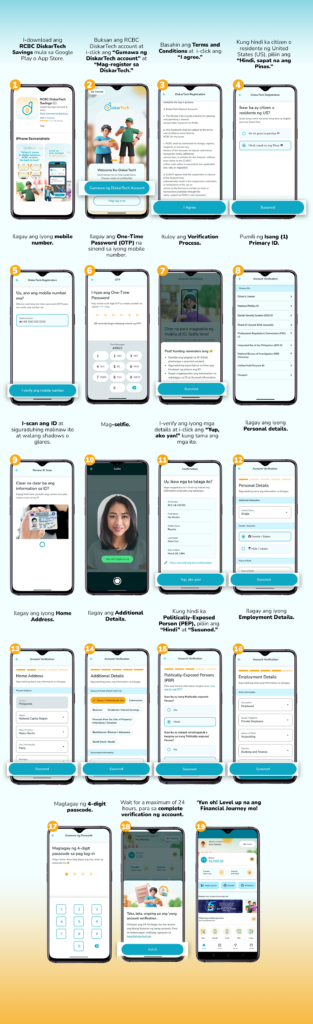
2. Anong klaseng account ang mabubuksan ko sa RCBC DiskarTech?
Sa RCBC DiskarTech, isang savings account na Basic Deposit Account (BDA) ang iyong mabubuksan.
Community BDA:
- Ilang minuto matapos ang verification mo, makakatanggap ka ng text na maaari mo nang magamit ang ilang features ng RCBC DiskarTech. Ang mga features na ito ay:
- Cash-in and incoming transfers
- Buy load / e-pins
- Bills payment
- Telemedicine
Full BDA:
Matapos ang maximum of 24 hours since ikaw ay nagpa-verify, makakatanggap ka ng text na fully verified na ang iyong account.
Kung ikaw ay nag-submit ng Primary ID, maaari mo na ring gamitin ang ibang features ng RCBC DiskarTech tulad ng:
- Withdrawals
- Transfers
- Insurance
- Mission
- Loans
- High Interest sa account
Kung ikaw ay nag-submit ng Secondary ID, maaari mo paring gamitin ang mga features ng Community
BDA. Para ma-upgrade sa full account, mag-submit lang ng Primary ID. Kailangan ring mag-submit ng
Primary ID within 12 months ng pagkabukas ng iyong Community BDA.
3. Anong ID ang pwedeng gamitin sa verification ng RCBC DiskarTech?
Ito ang list of IDs na maari mong gamitin:
PRIMARY IDs:
1. Passport
2. Driver’s License
3. Unified Multi Purpose ID
4. Social Security System (SSS) ID
5. Postal ID (Issued 2016 onwards)
6. Professional Regulations Commission (PRC) ID
7. Integrated Bar of the Philippines (IBP) ID
8. Seaman’s book
9. National Bureau of Investigation (NBI) Clearance
10. Quezon City ID
11. National PhilSys ID
Ihanda ang original na ID at siguruhing nasa maayos na condition ito. Hindi tatanggapin ng system ng RCBC DiskarTech ang damaged na ID. Hindi rin pwede ang photocopy lang ng ID (black and white man ito o colored) o digital copy (kukunan sa screen ng computer o iba pang gadget).
4. Ano ang Community BDA?
Community BDA ang account mo kapag secondary ID ang iyong ginamit sa account verification. Maaari
mo rin i-upgrade ang iyong account. Mag submit lang ng 1 primary ID para ma-lift ang restrictions ng
iyong BDA.
5. Pwede pa rin ba gumamit ng RCBC DiskarTech kahit Community BDA?
Yes, pero limited. Available ang mga sumusunod kapag Community BDA:: Deposit and transfer from other banks (up to balance limit of Php 5,000), Buy Load/ePins, Bills Payment, at Telemedicine Purchase.
6. Hanggang magkano ang maximum deposit ng Community BDA?
Ang maximum deposit for Community BDA ay Php 10,000.00 lang.
7. Hanggang kalian pwede magsubmit ng ID kapag Community BDA?
Isang taon na pwedeng Community BDA ang isang account. Kapag hindi ito na-verify gamit ang 1 primary ID na hinihingi, ang RCBC DiskarTech account ay isasara after a year.
1. What’s RCBC DiskarTech? Anong magagawa ko rito?
Ang RCBC DiskarTech ay ang unang Taglish super app sa bansa. Isa itong all-in-one super app kung saan pwede kang magbukas ng savings account, mag-deposit at mag-withdraw ng pera sa mga partner channels tulad ng 7-Eleven at Bayad Center, mag-ipon ng pera, mag-transfer ng pera sa ibang ma-DiskarTech, magbayad ng bills, at bumili ng load pati telemedicine products! Abangan ang iba pang exciting features na coming soon na!
2. Pwede ba ako diyan?
As long as pasok ka sa mga criteria na ito, pwede kang gumamit ng RCBC DiskarTech!
- 18 years old and above
- Filipino
- Non-US person (Hindi US resident o citizen)
3. Ano ang gagawin kung nakalimutan ang passcode ko?
Pwede kang gumawa ng bagong passcode. Sundan lang ang steps na ito:
- Pindutin ang “Nakalimutan ang password?” sa log-in screen ng RCBC DiskarTech.
- I-enter ang nickname o username mo.
- Pindutin ang “Mag-send ng OTP sa mobile number.”
- Pansinin ang lalabas na digits ng cellphone number na padadalhan ng OTP. Kung iba ito sa registered number mo ay maaaring mali ang nickname o username na inilagay. Tandaan na case sensitive ito at dapat tama ang gamit ng small at capital letters.
- Maglagay ng bagong passcode at i-confirm ito.
- I-enter ang one-time password na pinadala sa iyong mobile number. · Bago na ang passcode mo!
4. Gaano kadalas kailangang magpalit ng passcode?
Automatic na mage-expire kada buwan ang passcode mo at hihingan ka ng app ng kapalit nito. Hindi pwedeng ulitin ang passcode mo para sa iyong sariling security.
Pagkatapos ay i-activate o muling i-on ang paggamit ng finger scan o face ID para sa pag-log in.
Huwag ibigay ang passcode mo kahit kanino. Hinding hindi hihingin ng isang RCBC DiskarTech representative ang passcode o OTP mo.
5. Ano ang gagawin kung nakalimutan ang passcode ko?
Pwede kang gumawa ng bagong passcode. Sundan lang ang steps na ito:
- Pindutin ang “Nakalimutan ang passcode/username?” sa log-in screen ng RCBC DiskarTech.
- I-enter ang hinihinging information tungkol sa account at pindutin ang “I-reset ang passcode ko.”
- Pumili kung saan ipapadala ang one-time password at i-type ito pagkatanggap.
- Maglagay ng bagong passcode at i-confirm ito. Bago na ang passcode mo!
6. Pwede bang palitan ang passcode kahit hindi nakalimutan ito?
Oo naman. Narito ang steps para dito:
Pumunta sa Account, pindutin ang Settings at hanapin ang Change Passcode.
I-confirm lang ang current passcode at magbigay ng bagong passcode. At i-confirm naman ang bagong passcode para matapos. Siguruhing tama ang mga ilalagay na detalye.
7. Ano ang gagawin ko kung nakalimutan ko ang username o nickname ko?
Para ma-retrieve ang nickname o username, sundan lang ang steps na ito:
- Sa log-in screen, pindutin ang “Nakalimutan ang password/nickname?”
- Ibigay ang hinihinging information (mobile number, buong pangalan, at date of birth).
- Piliin ang “I-retrieve ang username ko.”
- I-enter ang matatanggap na one-time password.
- At hintaying i-text ang nickname o username.
- Para naman palitan ang nickname o username, sundan ang steps na ito:
- Pumunta sa “Account,” piliin ang “Settings” at pindutin ang “Change username.“
- Maglagay ng bagong nickname o username.
- I-enter ang matatanggap na one-time password.
8. Ano ang gagawin kung na-block ang account ko?
Para ma-access muli ang iyong account, sundan lang ang steps na ito:
- Pindutin ang ‘Nakalimutan ang passcode.’
- Ilagay ang iyong full name, mobile number at birthday.
- Gumawa ng bagong passcode.
- Ilagay ang iyong one-time password (OTP) na ise-send sa mobile number na gamit ng app mo. Tandaan: ‘Wag na ‘wag ibibigay sa kahit sino ang iyong OTP!
- Gamitin ang bagong password at dumiskarte nang walang hadlang.
9. Paano i-on ang in-app notifications?
Ang in-app notifications ay para makatanggap ang users ng latest news and updates tungkol sa RCBC DiskarTech. Sakaling hindi gusto na maka-receive nito, pumunta lang sa “Account”, piliin ang “Settings” at i-on ang “Notifications.”
10. Paano magkaroon ng access sa DiskarTech savings account?
Ang DiskarTech ay isang mobile app kung saan ang mga customer ay makakapagbukas ng isang DiskarTech savings account. Ang pag-access sa nasabing savings account ay ginagawa lamang sa pamamagitan ng DiskarTech App. Dahil dito, ang DiskarTech bank account at ang pag-access dito sa pamamagitan ng DiskarTech App ay iisa at pareho.
11. Pwede ko ba matanggal ang aking account sa DiskarTech?
Ang pag-delete ng iyong account upang matanggal ang iyong personal na data ay hindi magiging posible sa DiskarTech App, dahil sa regulasyon ng Bangko Sentral ng Pilipinas (Bangko Sentral ng Pilipinas o BSP). Ito ay batay sa pagpapanatili ng mga detalye ng account. Ibig sabihin, dapat panatilihin ng mga bangko ang data ng customer na nauugnay sa isang bank account bilang mga record (parehong personal na impormasyong ginamit upang magbukas ng bank account at mga transactional/balance record).
1. Ano ang dalawang uri ng Basic Deposit Account (BDA) sa DiskarTech?
FULL BASIC DEPOSIT ACCOUNT
Ito ay Basic Deposit Account na ginamitan ng primary government-issued ID at na-fully
verified sa eKYC. Ito ay may account limit na PHP 49,700.00.
COMMUNITY BASIC DEPOSIT ACCOUNT
Ito ay ang dating Basic Deposit Account na tinuturing na “restricted” dahil Secondary ID lamang ang ginamit sa eKYC.
Ang Community BDA ay may aggregate account balance limit na PHP 10,000 (mula sa PHP 5,000 dati) na ang ibig sabihin ay hindi dapat lalampas sa PHP 10,000 ang total cash in transactions (deposit, inward fund transfer, claiming of remittance, crediting of missions incentives) at di rin dapat lumampas sa PHP 10,000 ang total cash out transactions (withdrawal; outward fund transfer; bills payment; buy load, telemedicine o insurance) kada buwan. Magrereset ang aggregate limit kada buwan.
Sa Community BDA, maaaring magamit ang lahat ng features ng DiskarTech except ang Loans Marketplace, DiskarTech Loans at Credit Score. Pwede ring kumita ang savings ng 4.00% interes kada taon.
REGULAR SAVINGS ACCOUNT
Ito ay isang Regular Savings Account na ginamitan ng primary government-issued ID at na-fully verified sa eKYC. Ito ay walang account limit. Maaaring gamitin ang lahat ng features ng DiskarTech. Kikita rin ng interest rate kada taon ang savings ayon sa inyong Average Daily Balance (ADB).
Average Daily Balance of PHP 0.01 to PHP 50,000.00 : 4.00%
Average Daily Balance of PHP 50,001.00 up to PHP 2,000,000: 1.00%
| # | PROFILE | DESCRIPTION | HIGHLIGHTS |
| 1 | Community BDA | Some Services/features are not allowed and must be upgraded to full BDA within 1 year • For users who submitted primary/secondary ID and passed first-level verification | • 4.00% per annum interest rate • Deposit and transfer from other banks (up to ₱ 10,000.00 monthly aggregate limit of all transactions) |
| 2 | Full BDA | All Transactions are allowed • For users who submitted primary ID and passed both levels of verification | • 4.00% per annum interest rate on the Average Daily Balance of up to ₱49,700.00 • Maximum deposit amount: ₱49,700.00. |
| 3 | Regular Savings Account | All transactions are allowed • For Approved PASADO loan Applicants and MySSS powered by RCBC DiskarTech users • For users who submitted primary ID and passed both levels of verification | • 4.00% per annum on the Average Daily Balance (ADB) of up to ₱50,000.00 • 1.00% per annum on the entire balance for ADBs from ₱50,000.01 up to ₱2,000,000.00 • Maximum deposit amount: ₱2,000,000.00 |
2. Ano ang mangyayari sa mga existing accounts na tinuturing na hindi Full Basic Deposit Account o yung tinatawag na “Restricted” sa system ng DiskarTech dahil sa paglabas ng bagong Community BDA?
Ang lahat ng hindi Full Basic Deposit Account o yung mga tinuturing na “restricted” accounts sa system ng DiskarTech ay automatically malelevel up to Community BDA. Mula sa limit na PHP 5,000, mae-enjoy na ngayon ang mas mataas na aggregated limit na PHP 10,000 kada buwan, ang paggamit ng halos lahat ng features at kikita na ang savings ng 4.00% interes kada taon.
3. Mayroon akong PHP 10,001 sa aking account at hindi ko ma-cash out ang natitirang piso dahil monthly aggregate limit na PHP 10,000. Ano ang dapat gawin?
Patience is a virtue ika nga. Pwede kang maghintay ng susunod na buwan para mawithdraw ang remaining PHP1 balance mo dahil back to zero every month ang cash out limit.
4. Maaari bang maging Full Basic Deposit Account ang Community BDA?
Yes. Maaaring lumevel up to a Full Basic Deposit Account ang Community BDA kung magsusumite ng valid government-issued Primary ID para magkaroon ng full verification ang account.
5. Anu-ano ang mga acceptable IDs para sa Basic Deposit Account sa DiskarTech?
Passport
Driver’s License
Unified Multipurpose ID (UMID)
Social Security System (SSS) ID
NBI Clearance
Postal ID (Issued March 2016 onwards)
Professional Regulation Commission (PRC) ID
Integrated Bar of the Philippines (IBP) ID
Seaman’s Book
Philsys National ID
QCitizen ID
InstaPay
1. Ano ang InstaPay?
Ito ay isang real-time at electronic na paraan para mag-pasa ng pera sa ibang bangko o e-wallet. Dahil sa tinatawag nating clear-before-settle arrangement, instant o pumasok agad ang confirmation ng iyong transaction!
2. May limit ba kung ilang beses ako pwedeng mag-InstaPay transaction sa isang araw?
Walang limit sa bilang ng transactions! Pero tandaan, may limit tayo sa halaga: maaari kang mag-transfer ng hanggang P50,000 per transaction at may daily total limit na P499,999.99.
3. May bayad ba kapag nag-transfer ako ng pera via InstaPay?
Bilang bahagi ng initiative para sa financial inclusion, LIBRE o walang transfer fees kapag InstaPay ang ginamit mo!
Ang initiative na ito ay alinsunod sa guidelines ng BSP Circular No. 1238, Series of 2026, na nanghihikayat sa mga financial institutions na magpatupad ng makatwiran at patas na pricing para sa mga electronic fund transfers.
4. Ano ang kailangan kong gawin kung nabawasan (debited) ang account ko pero nagka-error habang nagpapadala via InstaPay?
Dahil sa clear-before-settle arrangement, automatic na ibinabawas muna ng RCBC DiskarTech ang pera sa iyong account bago ito ipasa sa receiving account.
Depende sa naging error, pwedeng ma-reverse at mabalik agad sa account mo ang pera (kasama ang transaction fee kung mayroon man). Maari din na maibalik ang pera sa susunod na banking day.
DiskarTech Tip: Maaari din munang i-check sa beneficiary kung pumasok ang pera. May mga pagkakataon na successful ang transfer kahit walang confirmation na natanggap mula sa kabilang bangko.
5. Kasama ba ang PESONet transfers sa libreng benefit na ito?
Hindi po. Hindi kasama ang PESONet transfers sa initiative na ito. Mayroon pa ring regular service fee na Php 10.00 bawat transaction kapag PESONet ang ginamit.
💡 May concerns ba? Huwag mag-atubiling mag-email sa ating DiskarTech customer care sa [email protected]
PesoNet
1. Ano ang PESONet?
Ang PESONet ay isa sa mga payment channel na ino-operate ng Philippine Payment Management Incorporated, sa ilalim ng Bangko Sentral ng Pilipinas (BSP). Classified ito ng BSP bilang isang Financial Market Infrastructure at pinamamahalaan bilang isang Prominently Important Payment System (PIPS). Ibig sabihin, sinisiguro ng BSP na ito ay ligtas, efficient, at matatag para sa iyong mga transaksyon.
2. May limit ba ang pag-transfer ng pera gamit ang PESONet?
Walang limit sa bilang o dami ng beses na pwede kang mag-transfer, pero may sinusunod tayong maximum amount kada transaksyon depende sa iyong DiskarTech account type:
- Para sa Community BDA: Ang maximum fund transfer amount kada transaksyon ay hanggang ₱10,000.00.
- Para sa Full BDA: Ang maximum fund transfer amount kada transaksyon ay hanggang ₱50,000.00.
- Para sa RSA: Ang maximum fund transfer amount kada transaksyon ay hanggang ₱500,000.00.
- Paalala lang: Ang daily outgoing aggregate limit (o ang kabuuang limit ng pwedeng ilabas na pera sa loob ng isang araw) ay ₱500,000.00, anuman ang iyong account type.
3. May bayad ba kapag nag-transfer ako ng pera via InstaPay?
Bilang bahagi ng initiative para sa financial inclusion, LIBRE o walang transfer fees kapag PESO net ang ginamit mo!
Ang initiative na ito ay alinsunod sa guidelines ng BSP Circular No. 1238, Series of 2026, na nanghihikayat sa mga financial institutions na magpatupad ng makatwiran at patas na pricing para sa mga electronic fund transfers.
4. Ano ang dapat kong gawin kung nabawasan ang account ko pero nagka-error ang aking PESONet transaction?
Kapag nag-fund transfer ka gamit ang PESONet, unang ibinabawas (debit) ng RCBC DiskarTech ang pera sa iyong account bago ito ipadala sa receiving bank. Kung magkaroon man ng error habang pinoproseso ito, automatic na mag-re-reverse ang system—ibig sabihin, ibabalik ang parehong transfer amount at transaction fee sa account mo.
Sa ibang mga pagkakataon, maaaring bumalik ang pera sa susunod na banking day. Pwede mo ring i-double check sa beneficiary o sa taong pinadalhan mo kung pumasok na ang halaga. May mga kaso kasi na successful naman ang transfer pero hindi lang nakapagpadala ng confirmation ang receiving bank.
5. Real-time ba na matatanggap ng beneficiary ang pera kapag nag-transfer ako gamit ang PESONet? Hindi po real-time tulad ng InstaPay dahil may sinusunod na cut-off time ang PESONet:
- Ang mga transfers na ginawa bago mag-2:00 PM cut-off ay ipapadala sa receiving bank sa mismong araw na iyon.
- Ang mga transaksyon naman na ginawa pagkatapos ng cut-off, tuwing holidays, o weekends ay ipapadala sa susunod na banking day.
💡 May concerns ba? Huwag mag-atubiling mag-email sa ating DiskarTech customer care sa [email protected]
1. May minimum ba ‘yan? Baka naman hindi ko afford.
Relax ka lang. Hindi kailangang maglagay agad ng pera sa account mo – pero pwede rin kung gusto mo. Zero initial deposit ito! Hindi rin kailangang mag-iwan ng pera sa account mo. Zero maintaining balance din ito!
2. Anong mangyayari sa pera ko sa RCBC DiskarTech? May interest ba ‘yan?
Oo, may interest ito na up to 4.00%
Kung ang balance ng iyong account ay PHP 0.00 – 50,000.00, kikita ka ng 4.00%
Kung Ang balance ng iyong account ay PHP 50,000.01 – P 2,000,000.00, kikita ka ng 1.00%
3. May maximum deposit ba ‘yan?
Pwede kang magdeposit, magcash-in, claim remittance, claim rewards hanggang PHP 49,700.00.
Halimbawa, kung may laman na ang iyong account na PHP 49,500.00 at magca-cashin/deposit ng PHP300, ang projected BDA ay PHP49,800. Ang resulta nito ay FAILED.
4. Bangko ba ang RCBC DiskarTech?
Ang RCBC DiskarTech accounts ay Basic Deposit Accounts (BDA) ng RCBC. Dahil diyan, ang pera na nilalagay mo sa DiskarTech ay naka-deposit sa RCBC.
5. So, may PDIC insurance na ‘yan?
Oo naman. Dahil RCBC account, may PDIC insurance ito.
1. Kung ang RCBC DiskarTech accounts ay deposit accounts rin ng RCBC, pwede ba ako mag-deposit sa RCBC branches?
Hindi, iba kasi ang RCBC DiskarTech sa regular RCBC products. Pero don’t worry dahil maraming partners ang RCBC DiskarTech kung saan pwedeng mag-deposit sa iyong DiskarTech account. Makikita mo sa app kung saan-saan pwede pero pinakakilala dito ang Bayad Center, 7-Eleven, at iba’t ibang pawnshops.
2. Magkano ang pwedeng i-deposit sa bawat transaction?
May minimum deposit amount na PHP 200.00 at maximum deposit account na PHP 25,000.00 kada transaction ang savings account mo.
Ang 7-Eleven ay mayroon namang maximum deposit limit na P10,000 kada araw kapag nag-cash in sa kanila gamit ang CLiQQ kiosk.
3. Gaano kadalas pwedeng mag-deposit sa RCBC DiskarTech?
Hanggang dalawang deposit transactions lang ang pwede kada araw at kailangang maghintay ng 15 minutes bago ang pangalawang deposit transaction.
Hindi rin pwedeng mag-deposit mula 9:00 p.m. hanggang 5:00 a.m. sa susunod na araw.
4. Saan pwedeng mag-cash in para sa RCBC DiskarTech?
Pwedeng mag-cash in sa mga sumusunod sa establishment:
- Bayad Center
- CVM Pawnshop
- Card Bank
- Cebuana Lhuillier
- Digipay
- eBiz
- ECPay Merchants*
- ExpressPay
- FS De Lepn Pawnshop & Jewelries
- Gaisano
- Guagua Rural Bank
- H Lhuillier Pawnshop
- NCCC Supermarket
- Optimum Exchange Remit
- Panalo Express
- Pay&Go
- Perahub
- Prince Warehouse Inc.
- Producers Bank
- Sendah Direct
- Sinag Pawnshop
- Tambunting Pawnshop
*Available in selected outlets only. Click here.
5. Paano mag-deposit ng pera sa RCBC DiskarTech account?
Madali lang mag-deposit! Sundan lang ang steps na ito:
- Mag-log in sa RCBC DiskarTech App.
- Pindutin ang “Deposit”
- Pumili ng cash-in method kung saan magde-deposit.
- I-enter ang amount na gustong i-deposit at pindutin ang “Susunod”.
- Hintayin ang lalabas na reference number. Tandaan, 30 minutes lang valid ang reference number na ‘to.
- Ipakita ang reference number sa cashier at ibigay ang perang ide-deposit.
- Hintayin ang confirmation na na-process na ang iyong deposit.
- Success!
6. Wala sa list ng partners ang ECPay merchant ko.
Pindutin lang ang icon for “ECPay” at mag-generate ng deposit reference number.
7. Paano mag-deposit ng pera sa RCBC DiskarTech account gamit ang 7-Eleven barcode?
Madali lang mag-deposit! Sundan lang ang steps na ito:
- Mag-log in sa RCBC DiskarTech App.
- Pindutin ang “Deposit”.
- Piliin ang “Partner Merchants”.
- Piliin ang 7-Eleven (barcode) at pindutin ang “Mag-desposit na!”.
- I-enter ang amount na gustong i-deposit at pindutin ang “Susunod”.
- Hintaying lumabas ang barcode.
- Ipakita ang barcode sa cashier at ibigay ang perang ide-deposit.
- Hintayin ang confirmation na na-process na ang iyong deposit.
- Success!