

Paano ka namin matutulungan?
Popular Questions
List of DiskarTech FAQs
1. Ano ang SSS LoanLite?
Ang SSS LoanLite ay isang short-term loan program ng Social Security System (SSS) na available sa mga accredited financial institutions tulad ng RCBC DiskarTech
Sa RCBC DiskarTech, ang mga qualified SSS members ay pwedeng mag-apply ng SSS LoanLite through a secure, all-digital application sa DiskarTech app.
2. Sino ang qualified mag-apply ng SSS LoanLite?
Maaaring maging qualified ka for SSS LoanLite Powered by RCBC DiskarTech kung:
- Filipino citizen ka
- At least 18 years old at below 65 years old ka sa pagtatapos ng loan term
- Active SSS member ka na may at least 12 posted monthly contributions
- May DiskarTech Regular Savings Account (RSA) ka na may validated SSS Transaction Reference Number (TRN)
Paano makakuha ng SSS TRN?
Makukuha ang iyong SSS Transaction Reference Number (TRN) kapag nag-apply ka ng MySSS Card sa My.SSS Portal at pinili ang RCBC DiskarTech bilang iyong Preferred Financial Institution (PFI).
Pagkatapos makuha ang TRN, kailangan itong ma-validate at ma-link sa iyong DiskarTech account.
Meron ka na bang MySSS Card Powered by RCBC DiskarTech?
Hindi mo kailangang hintayin na makuha ang physical card para makapag-avail ng SSS LoanLite. Basta successfully completed na ang iyong MySSS Card application, may valid SSS TRN ka na, at nakumpleto mo na ang required account setup at verification sa DiskarTech app, maaari ka nang mag-apply for SSS LoanLite Powered by RCBC DiskarTech, subject to eligibility.
Kung Basic Deposit Account (BDA) pa ang DiskarTech account mo:
Kailangan mo munang i-upgrade ang account mo sa Regular Savings Account (RSA) at kumpletuhin ang required verification.
Kailangan ko ba ng physical MySSS Card para makapag-apply ng SSS LoanLite?
Hindi mo na kailangang hintayin ang physical MySSS Card bago makapag-apply.
Kailangan mong makumpleto ang iyong MySSS Card application, magkaroon ng valid SSS Transaction Reference Number (TRN), at makumpleto ang required DiskarTech account setup at verification.
Kapag successfully linked na ang iyong SSS TRN at qualified ang iyong account, maaari ka nang mag-apply for SSS LoanLite through the DiskarTech app, subject to eligibility.
Final loan eligibility is subject to SSS validation and applicable SSS LoanLite requirements.
3. Ano ang SSS Transaction Reference Number (TRN)?
Ang SSS Transaction Reference Number (TRN) ay isang unique reference number na ginagamit para mai-link ang iyong SSS records sa iyong DiskarTech account.
Makukuha ang iyong SSS TRN kapag nag-apply ka ng MySSS Card sa My.SSS Portal at pinili ang RCBC DiskarTech bilang iyong Preferred Financial Institution (PFI).
Kailangan ng valid at successfully linked na SSS TRN para ma-check ang iyong eligibility for SSS LoanLite.
4. Magkano ang pwede kong ma-loan?
Pwede kang mag-loan mula ₱1,000 hanggang ₱20,000, payable in 60 or 90 days.
Ang approved loan amount at payment term ay depende sa iyong eligibility. Makikita mo ang available loan offer sa DiskarTech app at makakatanggap ka rin ng SMS notification tungkol dito.
5. Ano ang interest, fees, at charges ng SSS LoanLite?
Ang SSS LoanLite ay may:
- 8% interest per annum or approximately 0.67% per month
- Up to ₱200 transaction fee per loan
- Additional add-on fee na hindi lalampas sa 3% per annum ng total loan amount
Ang applicable fees ay automatically deducted sa iyong loan proceeds.
Bago mag-confirm, makikita mo sa DiskarTech app ang applicable interest, fees, at net loan proceeds.
6. Bakit hindi ko makita ang SSS LoanLite feature sa DiskarTech app?
Available ang SSS LoanLite sa qualified users na may verified DiskarTech Regular Savings Account (RSA) at successfully linked SSS Transaction Reference Number (TRN).
Kung BDA pa ang account mo:
I-upgrade muna ito to a Regular Savings Account (RSA).
Kung RSA na pero wala pang linked SSS TRN:
Mag-apply ng MySSS Card through the My.SSS Portal at piliin ang RCBC DiskarTech bilang iyong Preferred Financial Institution (PFI) para makuha ang iyong SSS TRN. Pagkatapos, complete the required linking and validation sa DiskarTech app.
Kung completed na ang requirements pero hindi pa rin available ang SSS LoanLite, maaaring ongoing pa ang eligibility validation ng iyong account.
Try again later or email [email protected] for assistance.
7. Bakit “Coming Soon” ang nakikita ko?
Maaaring lumabas ang “Coming Soon” kung wala pang successfully linked SSS Transaction Reference Number (TRN) ang iyong DiskarTech account.
Para makakuha ng SSS TRN, mag-apply ng MySSS Card sa My.SSS Portal at piliin ang RCBC DiskarTech bilang iyong Preferred Financial Institution (PFI).
Kapag nakuha at successfully linked na ang iyong SSS TRN at qualified na ang iyong account, maa-access mo na ang SSS LoanLite, subject to eligibility and product availability.
8. Paano ako mag-a-apply ng SSS LoanLite?
- Open DiskarTech app
- Tap SSS LoanLite
- Basahin at mag-agree sa Client Consent at applicable terms
- Ilagay ang iyong SSS Number at employment details
- Tingnan kung qualified ka at i-review ang available loan offer
- Piliin ang loan amount at payment term na available sa iyo
- Kumpletuhin ang required details at authentication
- I-review ang loan details, Terms and Conditions, Promissory Note, at Disclosure Statement
- Confirm your loan availment
Kapag successful ang availment, ang net loan proceeds ay maki-credit diretso sa iyong DiskarTech account.
9. Hanggang kailan valid ang loan offer ko?
Valid ang iyong loan offer until 11:59 PM on the same day.
Kapag hindi mo ito na-accept within the validity period, mag-e-expire ang offer. Maaari kang mag-apply ulit pagkatapos mag-expire ang offer, subject to eligibility.
10. Kailan ko matatanggap ang loan proceeds?
Kapag fully verified ang iyong DiskarTech account at successfully completed ang loan availment, ang net loan proceeds ay maki-credit diretso sa iyong DiskarTech account.
11. Saan ko makikita ang payment schedule ko?
Makikita mo ang iyong payment schedule at payment status sa DiskarTech app.
- Mag-log in sa DiskarTech app
- Tap SSS LoanLite
- Tap Upcoming Amortization Schedule o ang ellipsis (…) button
- Makikita na ang iyong Amortization Schedule
12. Pwede ba akong mag-apply ulit pagkatapos kong mabayaran ang loan?
Yes. Pwede kang mag-apply ulit kapag fully paid na ang existing SSS LoanLite mo, subject to eligibility.
I-open lang ang DiskarTech app, tap SSS LoanLite, at sundan ulit ang application process.
13. Paano kung hindi ako qualified for SSS LoanLite?
Ang eligibility for SSS LoanLite ay nakadepende sa applicable SSS eligibility requirements at loan validation criteria.
Maaaring hindi ka maging qualified dahil sa:
- Hindi mo na-meet ang required SSS contributions
- May existing past due o delinquent loan
- Hindi mo na-meet ang iba pang SSS eligibility requirements
Kung may mismatch sa iyong SSS at DiskarTech details:
I-update ang iyong records sa SSS o mag-request ng DiskarTech account information. Update by emailing [email protected].
14. Pwede ba akong mag-apply ulit kung hindi na-approve ang application ko?
Yes. Kapag na-resolve na ang dahilan kung bakit hindi na-approve ang iyong application, pwede kang mag-apply ulit, subject to eligibility.
Para sa SSS eligibility concerns:
SSS Hotline: 1455
7:00 AM to 10:00 PM, Mondays to Fridays
Email: [email protected]
15. Approved na ang SSS LoanLite ko pero hindi pa credited. Ano ang gagawin ko?
I-refresh muna ang DiskarTech app at i-check ulit ang iyong account.
Kung hindi pa rin reflected ang loan proceeds, email [email protected] para ma-check at ma-assist ka namin.
16. Paano ko makukuha o magagamit ang loan proceeds ko?
Kapag credited na sa iyong DiskarTech account, pwede kang:
- Mag-withdraw sa RCBC ATMs o ATM Go terminals gamit ang cardless withdrawal
- Mag-transfer sa RCBC o ibang bank account via InstaPay o PESONet
- Mag-cash out via Bayad Center, PERA HUB, o Cebuana Lhuillier
Applicable transaction limits and fees may apply.
17. Pwede bang diretso sa ibang bank account ang loan proceeds ko?
Hindi. Ang SSS LoanLite proceeds ay credited directly sa iyong DiskarTech account.
Once credited, pwede mo itong i-transfer sa ibang bank account gamit ang fund transfer feature ng DiskarTech app.
18. Pwede ba akong mag-apply kung may existing RCBC loan ako?
Yes. Pwede ka pa ring mag-apply for SSS LoanLite kahit may existing RCBC Home Loan, Auto Loan, Pasado Loan, Personal Loan, o Salary Loan, basta qualified ka at wala kang past due RCBC loan.
19. Pwede ko bang i-cancel ang loan pagkatapos kong tanggapin ang offer?
Hindi na. Once accepted na ang loan offer at credited na ang proceeds sa iyong DiskarTech account, hindi na ito pwedeng i-cancel.
Kaya i-review muna nang mabuti ang loan amount, payment term, interest, fees, net proceeds, at payment schedule bago mag-confirm.
20. Pwede ko bang baguhin ang due date ko?
Hindi. Fixed na ang payment schedule kapag na-book na ang loan.
Para makita ang iyong schedule:
DiskarTech app → SSS LoanLite → Upcoming Amortization Schedule
21. Kailan ang due date ng loan payment ko?
Ang due date ay maaaring sa 15th day o end of the month, depende sa date kung kailan na-approve ang iyong loan.
Kung ang due date ay natapat sa weekend o holiday, ang collection ay pwedeng malipat sa next working day.
Kung na-approve from 1st to 15th of the month:
Ang earliest collection date ay sa end of the month. Ang succeeding payments ay every 15th o end of the month, ayon sa iyong schedule.
Kung na-approve from 16th to 31st of the month:
Ang earliest collection date ay sa 15th of the following month. Ang succeeding payments ay susunod sa applicable 15th/end-of-month schedule.
Para sa exact payment dates, laging i-check ang iyong Amortization Schedule sa DiskarTech app.
22. Pwede ba akong mag-apply kung may existing SSS LoanLite pa ako?
Hindi. Kailangan munang fully paid ang existing SSS LoanLite mo bago ka makapag-submit ng panibagong application.
23. Malalaman ba ng employer ko na nag-apply ako ng SSS LoanLite?
Walang direct notification mula sa DiskarTech sa iyong employer tungkol sa iyong SSS LoanLite application.
24. Pwede ba akong mag-apply during weekends or holidays?
Yes. Dahil all-digital ang SSS LoanLite, maaari mong ma-access ang service through the DiskarTech app, subject to system availability, maintenance schedules, eligibility validation, at applicable processing requirements.
25. Paano kung kulang ang balance ng DiskarTech account ko sa due date?
Siguraduhing may sapat na balance ang iyong DiskarTech account bago ang due date.
Kung kulang ang balance, maaaring patuloy na subukang i-auto-debit mula sa iyong account ang outstanding SSS LoanLite obligation kapag may pumasok na funds, hanggang fully paid ang amount due.
Applicable interest and penalties may apply sa unpaid amount.
26. Paano ko babayaran ang loan payment ko?
Automatic na ide-debit ang iyong loan payment mula sa DiskarTech account mo based sa iyong payment schedule.
Siguraduhin lang na may sapat na balance ang account mo bago ang due date para tuloy-tuloy ang iyong payment.
27. Bukod sa Automatic Debit Arrangement (ADA), may ibang paraan ba para magbayad?
Sa ngayon, ang primary payment method para sa SSS LoanLite ay Automatic Debit Arrangement (ADA) through your DiskarTech account.
Hindi available ang over-the-counter payment sa RCBC branches para sa SSS LoanLite.
28. Pwede ba akong magbayad gamit ang SSS STL biller?
Sa ngayon, hindi pa available ang payment ng SSS LoanLite through the SSS STL biller.
29. Makakatanggap ba ako ng reminder bago ang due date?
Yes. Makakatanggap ka ng payment reminders starting five days before your due date through in-app notifications, SMS, at email.
Makakatanggap ka rin ng confirmation para sa successful auto-debit transactions.
30. Na-deduct na ang payment pero hindi pa posted. Ano ang gagawin ko?
May pagkakataong hindi agad mag-reflect ang payment dahil sa processing time o weekend/holiday schedule.
I-check muna ulit ang DiskarTech app pagkalipas ng ilang oras.
Para makita ang iyong transaction history:
- Mag-log in sa DiskarTech app
- Tap SSS LoanLite
- Tap Upcoming Amortization Schedule o ang ellipsis (…) button
- Tap ang Transaction History icon sa upper-right portion ng Amortization Schedule screen
- Makikita na ang iyong Transaction History
Kung hindi pa rin reflected ang payment, email [email protected] para ma-check at ma-assist ka namin.
31. Ano ang mangyayari sa SSS LoanLite ko kung mag-file ako ng SSS benefit claim for retirement, disability, or death?
Kapag nag-file ng applicable SSS benefit claim, ang outstanding SSS LoanLite balance ay magiging due and payable, whether current or past due.
Susubukan munang kolektahin ang outstanding balance through automatic debit sa iyong DiskarTech account.
Kung may remaining balance na hindi nabayaran within three days from SSS notification, maaari itong i-report sa SSS at ibawas sa applicable benefit proceeds, subject to SSS policies.
32. Ano ang mangyayari kung past due pa rin ang loan 60 days after the loan term?
Kung past due pa rin ang loan 60 days after the end of the loan term, maaari itong i-report sa SSS at maging subject sa applicable SSS collection and recovery policies.
Para sa mga katanungan tungkol dito, makipag-ugnayan directly sa SSS.
33. Bakit mas mababa ang approved loan amount ko kaysa sa amount na gusto kong i-loan?
Ang approved loan amount ay naka-base sa SSS eligibility rules at applicable financial assessment.
Kaya maaaring iba ang approved amount sa amount na gusto mong i-loan.
Para sa questions tungkol sa computation o eligibility, contact SSS at [email protected].
34. Ano ang gagawin ko kung dalawang beses na-deduct ang payment ko?
I-check muna ang iyong Transaction History sa DiskarTech app.
Kung may extra deduction at hindi ito na-reverse after the applicable processing period, email [email protected] at i-provide ang transaction details o screenshot para ma-check at ma-assist ka namin.
35. Ano ang gagawin ko kung naglo-loading o nag-error ang app habang nag-a-apply?
Subukan muna ang mga ito:
- Check your internet connection
- Close and reopen the DiskarTech app
- Try again after a few minutes
Kung patuloy ang issue, email [email protected] para ma-check at ma-assist ka namin.
36. Ano ang gagawin ko kung hindi ko natanggap ang email authentication code?
I-check muna ang iyong Spam or Junk folder.
Kung wala pa rin ang authentication code o kailangan mong i-update ang registered email address mo, email [email protected].
37. Ano ang gagawin ko kung mali o hindi tugma ang SSS number o personal details ko?
Siguraduhing exact match ang iyong name, middle initial, birthdate, at SSS Number sa iyong official SSS records at DiskarTech profile.
Kapag may hindi tugma, maaaring hindi mag-proceed ang iyong application.
Kung SSS records ang kailangang i-update:
Pumunta sa pinakamalapit na SSS branch para ma-update ang iyong details.
Kung DiskarTech information ang kailangang i-update:
Email [email protected] para mag-request ng account information update.
Kapag updated at tugma na ang iyong records, pwede kang mag-apply ulit, subject to eligibility.
38. Sino ang dapat kong kontakin kung kailangan ko ng tulong sa SSS LoanLite?
Para sa concerns tungkol sa SSS LoanLite sa DiskarTech app, account, o transactions, maaari kang makipag-ugnayan sa amin:
Email: [email protected]
Support Hours: 6:00 AM to 7:00 PM, Mondays to Sundays, including holidays
Para sa SSS membership, eligibility, contributions, at SSS records:
SSS Hotline: 1455
7:00 AM to 10:00 PM, Mondays to Fridays, excluding national and special holidays
Email: [email protected]
1. Ano itong bagong security update ng DiskarTech?
May paparating na bagong security update sa DiskarTech para mas maayos at tuloy-tuloy ang pag-access sa account mo.
Bahagi ito ng patuloy naming pagpapahusay ng app at pagsunod sa mga bagong security standards para makatulong sa pagprotekta ng account mo laban sa scams at unauthorized access.
2. Ano ang biometric authentication?
Ang biometric authentication ay paraan ng pag-confirm ng identity mo gamit ang fingerprint o face ID.
Sa bagong update, maaari itong gamitin sa pag-login at pag-approve ng ilang transactions para mas maging maayos ang paggamit ng app.
3. Ilang cellphone ang puwedeng gamitin sa isang DiskarTech account?
Sa bagong update, isang (1) registered device lang ang puwedeng naka-link sa isang DiskarTech account sa isang pagkakataon.
Kapag nag-register ka ng bagong phone, automatic na mawawala ang access sa dating phone.
4. Ano ang mangyayari kung magpalit ako ng cellphone?
Pwede mo pa ring i-register ang account mo sa bago mong phone.
Kapag nagpalit ka:
- Automatic na mawawala ang access ng dating phone
- Magkakaroon ng 24-hour security waiting period
Sa loob ng security waiting period:
- Makikita mo pa rin ang iyong balance at account details
- Pero may ilang transactions na pansamantalang hindi muna available
5. Ano ang puwede kong gawin habang may security waiting period?
Habang active ang security waiting period, pwede mo pa ring:
- Tingnan ang transaction history
- I-check ang account settings
- Magpalit ng passcode
- Tingnan ang interest earned
- Mag-claim ng completed missions
- Tingnan ang rewards
- I-check ang DiskarTech Score
6. Anong transactions ang pansamantalang hindi available habang may security waiting period?
Habang active ang security waiting period, pansamantalang hindi muna available ang:
- Fund transfer
- Bills payment
- Buy load
- Insurance payments
- Telemedicine payments
- Cash in at cash out
- QR payments
- ATM cardless withdrawal
- Loan applications at repayments
- Remittance disbursement
Kapag tapos na ang security waiting period, automatic na babalik ang access sa mga ito.
7. Makakatanggap ba ako ng abiso kapag nagpalit ako ng device?
Oo.
Makakatanggap ka ng SMS:
- kapag na-register ang bagong device
- bilang paalala bago matapos ang security waiting period
- kapag fully available na ulit ang iyong account access
8. Ano ang minimum phone requirements para sa bagong update?
Para magamit ang latest version ng DiskarTech:
Android: Version 9.0 pataas
iPhone (iOS): Version 16 pataas
Kung mas mababa rito ang version ng phone mo, i-update muna ang software para tuloy-tuloy ang paggamit ng app.
9. Paano na ako magla-login at mag-a-approve ng transactions?
Depende ito sa gamit mong device:
Kung registered ang device mo:
Pwede kang gumamit ng biometrics, tulad ng fingerprint o face ID. Kung naka-off ang biometrics, OTP via SMS ang gagamitin.
Kung bagong device ito:
OTP via SMS muna ang kailangan para sa initial setup.
10. Anong transactions ang gagamit ng biometrics o OTP?
Maaaring gamitin ang biometrics o OTP para sa:
- Fund transfers
- Change passcode
- Forgot passcode
- Pag-enable o disable ng biometrics
- Device registration
- Device removal
Depende sa transaction, maaaring biometrics, OTP, o parehong verification ang kailangan.
11. Kailan automatic na mag-o-off ang biometrics ko?
Automatic na madi-disable ang biometrics kapag:
- Nagdagdag o nagpalit ka ng fingerprint o face ID sa phone settings
- Nagpalit ka ng registered device
Pwede mo itong i-set up ulit pagkatapos.
12. Paano kung madumi, may semento, o may gasgas ang daliri ko at hindi mabasa?
Okay lang.
Pwede mong gamitin ang Face ID kung supported ng phone mo.
Kung hindi available o hindi gumagana ang biometrics, pwede kang gumamit ng OTP via SMS para maituloy ang transaction.
13. Pwede ko bang gamitin ang DiskarTech account ko sa phone ng asawa o anak ko?
Sa bagong update, isang phone lang ang puwedeng naka-register sa isang account sa isang pagkakataon.
Kung ilalagay mo ito sa ibang phone, automatic na mawawala ang access sa dating phone.
14. Ano ang gagawin ko kung nawala o nanakaw ang phone ko?
I-report agad sa amin sa [email protected] para matulungan ka.
Pwede ka naming tulungan sa:
- pag-block ng account
- pag-unregister ng old device
- pag-reset ng passcode
- iba pang account concerns
15. Kailangan ko bang mag-register ulit kapag live na ang bagong security update?
Oo. Sa pag-update ng app, maaaring hilingin sa’yo na i-register muli ang iyong device bilang bahagi ng bagong security process.
Good news: Sa unang registration sa bagong update, wala munang 24-hour security waiting period.
Magbibigay kami ng step-by-step guide kapag available na ito.
- How do I transition from Basic Deposit Account (BDA) to Regular Savings Account (RSA)?
a. BDA: Account is Greater than 1 year
*For the first time log in, a prompt will appear to upgrade to RSA. Another option, is to go to Account, and then click Upgrade to RSA on the top portion of the screen
- Upload Primary ID
- Capture video selfie
- Enter SSS transaction number (*Note: If you don’t have SSS transaction number, you may skip this step)
- Validate details from the ID captured
- Enter employment details
- Submit
- Wait for the verification. TAT is 24 hours (*Note: While waiting for the verification, customer may still use the app)
- Customer will be notified once the account has been fully verified.
b. BDA: Account is Less than 1 year
Note: For the first time log in, a prompt will appear to upgrade to RSA. Another option, is to go to Account, and then click Upgrade to RSA on the top portion of the screen
- Enter SSS transaction number. (Note: If you don’t have SSS transaction number, you may skip this step)
- Validate details from the ID captured
- Enter employment details
- Submit
- Wait for the verification. TAT is 24 hours (*Note: While waiting for the verification, customer may still use the app)
- Customer will be notified once the account has been fully verified.
c. Community BDA
Note: For the first time log in, a prompt will appear to upgrade to RSA. Another option, is to go to Account, and then click Upgrade to RSA on the top portion of the screen
- Upload Primary ID
- Capture video selfie
- Enter SSS transaction number. (*Note: If you don’t have SSS transaction number, you may skip this step)
- Validate details from the ID captured
- Enter employment details
- Submit
- Wait for the verification. TAT is 24 hours (*Note: While waiting for the verification, customer may still use the app)
- Customer will be notified once the account has been fully verified.
1. How can I apply for a MySSS Card Powered by RCBC DiskarTech
a. Log in to your My.SSS account via the My.SSS Portal.
b. From the available services, select the option to apply for a MySSS Card.
c. Ensure that you have completed the SSS identity verification procedures.
d. Choose RCBC DiskarTech as your preferred Participating Financial Institution (PFI).
e. Provide your consent to the Data Sharing Agreement, then secure and take note of your MySSS Card Transaction Number.
f. Download the RCBC DiskarTech app via Google Play, App Store, or Huawei AppGallery.
g. Open the app and register using your MySSS Card Transaction Number. When prompted, select “SSS Member: Gamitin ang MySSS Card Transaction Number”
h. Complete the Know-Your-Customer (KYC) process within the app by uploading a valid government-issued ID and taking a selfie for identity verification.
i. Once your application is approved and your identity is verified, you will receive further instructions regarding the issuance and delivery of your MySSS Card.
2. What are the requirements needed to apply for a MySSS Card Powered by RCBC DiskarTech?
To successfully apply for a MySSS Card Powered by RCBC DiskarTech, you must prepare the following:
a. Completion of National ID Registration, as identity verification in the My.SSS Portal is powered by the PSA’s National ID eVerify system.
b. Updated contact information (mobile number and email address) in your SSS records. c. An issued MySSS Card Transaction Number, which you can obtain through your My.SSS Portal account.
d. A valid government-issued ID and a selfie to complete the Know-Your-Customer (KYC) process in the RCBC DiskarTech app
3. What are the features, benefits and/or capabilities of the MySSS Card Powered by RCBC DiskarTech?
a. RCBC DiskarTech Mobile App
i. MySSS Card Availment / Onboarding
ii. Card Linking/Activation
iii. Lock/Unlock Card
iv. Block Card
v. View Card Details
vi. Balance Inquiry
vii. Fund Transfer
viii. Cardless Withdrawal
ix. Interest Earning
x. Buy Load
xi. Buy Insurance
xii. Buy Telemedicine
xiii. Pay Bills
xiv. Remittance Claiming
xv. Rewards
b. ATM / ATM GO / POS
i. Withdrawal (Intrabank & Interbank)
ii. Balance Inquiry
iii. PIN Change
iv. Bills Payment
v. IBFT (Inter Bank Fund Transfer)
vi. Prepaid Reload
vii. POS Purchase
4. How much is it? How do I pay?
The card fee is Two Hundred Pesos (P200.00) and will be deducted from the RCBC DiskarTech account upon successful request for the physical card
5. How and when will I receive the MySSS Card Powered by RCBC DiskarTech?
The MySSS Card can be picked up at the selected RCBC branch in 15-20 working days depending on location.
6. Can I use the RCBC DiskarTech app if I don’t have the MySSS Card issued through RCBC DiskarTech yet?
Yes. You can use the RCBC DiskarTech and all in-app features/services upon successful account verification even without the physical card.
7. Can I receive SSS loan releases and/or benefits through MySSS Card Powered by RCBC DiskarTech Card
Yes. Benefits or loan releases may already be received through the RCBC DiskarTech App even if the physical MySSS card has not been issued.
8. How do I transfer funds to another DiskarTech account with an SSS number using another ATM card?
Use the DiskarTech SSS card number instead of the account number for SSS fund transfers.
9. Who can I contact if I have questions or issues?
For any questions or issues, you may contact the RCBC DiskarTech Help Desk at [email protected]
10. Who can apply for the MySSS Card Powered by RCBC DiskarTech?
SSS members are eligible if they meet all of the following requirements:
- They are registered with PhilSys and issued with PhilSys Number (PSN)
- They are a qualified SSS member with a My.SSS account
- They have an updated email address, mobile number, local mailing or home address in SSS records
- They have no UMID ATM/Pay Card enrolled in SSS
- They do not have an active RCBC DiskarTech account at the time of MySSS Card application via the My.SSS portal (Soon for existing RCBC DiskarTech users!)
Research Collaboration between RCBC and IPA Philippines
- Ano ang purpose ng research na ito?
Ang purpose ng research collaboration ng RCBC at IPA ay pag-aralan ang epekto ng presyo ng digital payments sa paggamit nito at sa iba pang financial behaviors. - Sino ang mga partner ng proyekto?
Ang RCBC (Rizal Commercial Banking Corporation) at IPA (Innovations for Poverty Action) Philippines ay ang mga pangunahing partner sa proyekto. Kasama rin sa research team ang mga eksperto mula sa iba’t ibang unibersidad tulad ng Ateneo de Manila University, College of William & Mary, National University of Singapore, at University of Sydney. - Paano pipiliin ang mga participant?
Ang mga active users ng Diskartech ay pipiliin by random draw at iimbitahang makasali sa study. Magkakaroon ng in-app consent process kung saan tatanungin ang mga user kung gusto nilang sumali sa pag-aaral. - Paano malalaman kung napili ako para sa study?
Makakatanggap ka ng in-app notification mula sa Diskartech na humihingi ng iyong consent para makasali sa study. - Ano ang mangyayari kapag sumali ako sa study?
Kung ikaw ay magbibigay ng consent para sumali, magkakaroon ng pagkakataong bumaba ang halaga ng InstaPay fees sa iyong account, at pag-aaralan ng RCBC at IPA kung paano nito maaapektuhan ang iyong transaction behavior. Kung ikaw ay sasali, ang iyong pangalan at mobile number ay ibabahagi rin sa IPA para sa mga follow-up surveys. - Gaano katagal ang study?
Ang study ay tatakbo ng tatlong buwan para sa Diskartech. Mayroon ding follow up phone survey pagkatapos ng tatlong buwan ng price discount. - Ano ang mangyayari sa data ko?
Ang data ng mga participant ay kokolektahin at gagawing anonymous bago ito gamitin para sa research. Lahat ng impormasyon ay ipo-process ayon sa data privacy laws ng Pilipinas. - Ano ang magiging benepisyo ko bilang participant?
Bukod sa pagkakataong bumaba ang InstaPay fees mo, makakatulong ka sa pagbuo ng mga rekomendasyon na rekomendasyon na maaaring makapag-improve ng digital payments sa Pilipinas. - Mayroon bang babayaran kung sumali ako?
Walang bayad o gastos sa pagsali. Sa halip, maaari ka pang makatipid dahil posibleng mabawasan ang iyong Instapay fees. - Paano ko malalaman ang resulta ng pag-aaral?
Ipapakita ng IPA ang resulta ng pag-aaral sa RCBC, at posibleng ibahagi rin ito sa mga regulatory bodies gaya ng BSP. Magiging bahagi ito ng mga rekomendasyon para sa mga digital payments policies. - Pwede ba akong umalis sa study?
Oo, at any time ay pwedeng tumigil o umalis sa study sa pamamagitan ng hindi pagbigay ng consent o pag-email sa [email protected]. Kapag nag-withdraw sa pag-participate sa study, hindi na kokolektahin ang iyong data para sa research purposes.
For New DiskarTech Clients
How much can I avail?
You can get approved for PHP 20,000 up to PHP 500,000 payable in 6 or 12 monthly installments. The approved loan amount and term will be displayed in the Pasado Portal after your loan application. An SMS will be sent to your registered mobile number about your loan offer.
Magkano ang pwede kong i-avail na loan?
Pwede kang ma-approve para sa loan na nagkakahalaga mula Php 20,000 hanggang Php 500,000, payable ng 6 or 12 monthly installments. Ang approved loan amount at term ay makikita sa Pasado Portal pagkatapos ng iyong loan application. Makakatanggap ka ng text sa iyong registered mobile number tungkol sa loan offer.
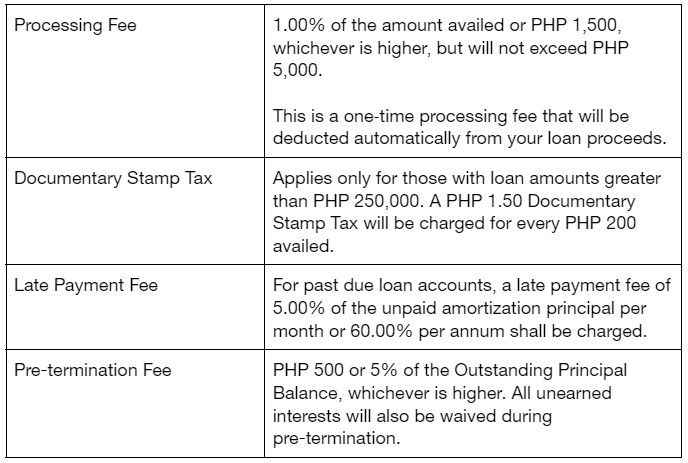
What are the fees and charges of a Pasado Loan?
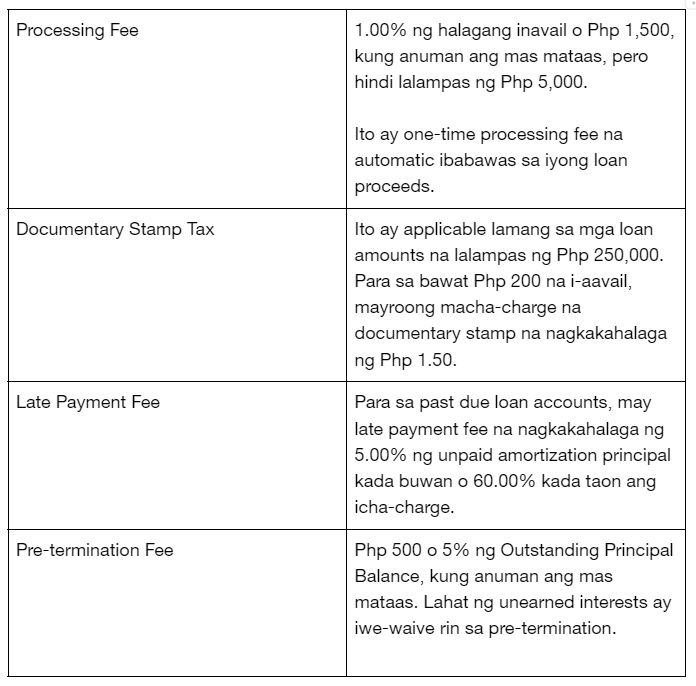
Ano ang mga fees at charges ng Pasado Loan?
What are the interest rates?
The monthly interest rate ranges from 1.58% to 2.83% or approximately 19.00% to 34.00% Effective Interest Rate (EIR) per annum.
Ano ang mga Interest Rate?
Ang monthly interest rate ay nagkakahalaga mula 1.58% hanggang 2.83% o approximately 19.00% hanggang 34.00% effective interest rate per annum.
Who is eligible for a Pasado Loan?
Any [non-US person] employed or self-employed Filipino citizen aged 21 to 65* years old who have yet to avail of a Personal Loan from RCBC.
*65 years old upon loan maturity
Sino ang qualified para sa Pasado Loan?
Isang [non-US person] na employed o self-employed Filipino citizen edad 21 hanggang 65* years old na mag-aavail pa lamang ng Personal Loan mula sa RCBC.
*65 years old upon loan maturity
How will I know if I am qualified for a Pasado Loan?
Simply go to pasado.ph → click Apply Now → select a Desired Loan Amount and Term → click Continue → enter a Promo Code or Skip → read the Terms and Conditions → click I Agree → enter your Mobile Number → enter the correct OTP → complete the Forms (Complete Name, Personal Information, Home Address, Work Information) → click Next → view your Pasado Results
Once you’re qualified (a.k.a. Pasado), simply download the DiskarTech app and create a DiskarTech account using the mobile number entered in the Pasado website (Pasado Portal)
Paano mag-apply ng Pasado Loan?
Pumunta sa Pasado.ph → click Apply Now → Piliin ang Desired Loan Amount at Term → Click Continue → Ilagay ang Promo Code o Skip → Basahin ang Terms and Conditions → Click ‘I Agree’ → Ilagay ang iyong Mobile Number → Ilagay ang tamang OTP → Kumpletuhin ang Forms (Complete Name, Personal Information, Home Address, Work Information) → click Next → tignan ang iyong Pasado Results
Kung qualified ka na (a.k.a. Pasado), maaari mong idownload ang DiskarTech App at gumawa ng DiskarTech account gamit ang mobile number na inilagay mo sa Pasado website (Pasado Portal).
How can I avail the loan once I am “Pasado”?
Once you are qualified for the Pasado Loan, simply download the DiskarTech mobile app from the App Store or Google Play Store. Create an account using the mobile number entered during the loan application in the Pasado Portal. When you already have a fully verified DiskarTech account, click on the “Pasado”, “Apply ng Loan”, or “Loans” buttons in the DiskarTech dashboard.
Paano ako makakapag-avail?
Kapag qualified ka na sa Pasado Loan, i-download ang DiskarTech mobile app mula sa App Store o Google Play Store. Gumawa ng account gamit ang mobile number na inilagay sa loan application sa Pasado portal. Kapag meron ng fully verified DiskarTech account, i-click ang “Pasado”, “Apply ng Loan”, o “Loans” buttons sa DiskarTech Dashboard.
What requirements do I need to submit?
You only need to submit one (1) Philippine government ID during the creation of a DiskarTech account.
- Philippine Passport
- LTO Driver’s License
- Unified Multi-Purpose ID (UMID)
- Social Security System (SSS) ID
- NBI Clearance
- PhilPost Postal ID (issued 2016 onwards)
- Professional Regulation Commission (PRC) ID
- Integrated Bar of the Philippines (IBP) ID
- Seaman’s Book
- National ID (PhilSys/PhilID)
- Printed National ID (ePhilID)
- QCitizen ID
Anong mga requirements ang kailangan kong i-submit?
Ang kailangan mo lang ay isang (1) Philippine government ID sa paggawa ng DiskarTech Account.
- Philippine Passport
- LTO Driver’s License
- Unified Multi-Purpose ID (UMID)
- Social Security System (SSS) ID
- NBI Clearance
- PhilPost Postal ID (issued 2016 onwards)
- Professional Regulation Commission (PRC) ID
- Integrated Bar of the Philippines (IBP) ID
- Seaman’s Book
- National ID (PhilSys/PhilID)
- Printed National ID (ePhilID)
- QCitizen ID
How soon do I get the proceeds?
Once fully verified in DiskarTech, you will get the proceeds, net of fees, in an instant. You will receive this as soon as you agree with the Terms and Conditions, Promissory Note, and Disclosure Statement.
Gaano kabilis ko makukuha ang inavail na loan?
Kapag fully verified na sa DiskarTech, agaran mo nang makukuha ang loan amount na net ng fees. Matatanggap mo kaagad ang amount kapag nag-agree ka na sa Terms and Conditions, Promissory Note, at Disclosure Statement.
After I received my loan, what are the methods available to withdraw my funds?
You can withdraw cash through any RCBC ATMs or ATM Go Terminals via QR Code or Reference Number Cardless Withdrawal. You may also transfer your funds to your RCBC account/s or other bank accounts via fund transfer.
Pagkatanggap ko ng loan, ano ang mga available methods para makapag-withdraw ng funds?
Pwedeng i-withdraw ang iyong cash saanmang RCBC ATMs o ATM Go Terminals gamit ang Cardless Withdrawal via QR Code o Reference Number. Pwede mo ring i-transfer ang funds sa iyong RCBC account/s o ibang bank accounts gamit ang fund transfer.
How will I pay for my monthly amortizations?
We’ve made it easy for you to pay your loan as this will be automatically deducted from your DiskarTech Basic Deposit Account (BDA) or Regular Savings Account (RSA).
You may also pay in advance by simply Logging into DiskarTech → Click on the Pasado button → Click “Bayaran” on the bottom right corner of the Pasado Loan dashboard → Select Monthly or Full Payment → Slide to Confirm → Enter the correct One-time Password (OTP) → Review the Payment Receipt.
Paano ako magbabayad ng monthly amortizations?
Mas madali nang makapagbayad ng loan mo dahil automatic na ibabawas na ito mula sa iyong Diskartech Basic Deposit Account (BDA) o Regular Savings Account (RSA).
Maaari ka ring magbayad in advance. Maglog-in lamang sa DiskarTech → Click ang Pasado Button → Click “Bayaran” sa bottom right corner ng Pasado Loan dashboard → Piliin ang Monthly o Full Payment → Slide para i-confirm → Ilagay ang tamang One-Time Password (OTP) → I-review ang payment receipt.
How will I know my payment schedule?
You may refer to the DiskarTech app for your payment schedule and progress. You may access this by logging in to your DiskarTech account → Go to the “Pasado” or “Loans” tab → See your Loan Amortization Schedule.
Paano ko malalaman ang payment schedule?
Pwede mong i-check sa DiskarTech App ang iyong payment schedule at progress. Maglog-in sa iyong DiskarTech account → Pumunta sa “Pasado” o “Loans” Tab → Tignan ang iyong Loan Amortization Schedule.
What is the validity of my Pasado Loan offer?
You have 90 days from the date you first received the offer to avail your loan.
Ano ang validity ng Pasado Loan Offer ko?
Mayroon kang 90 days mula sa araw na natanggap mo ang offer para ma-avail ang iyong loan.
What if I am not qualified?
If you are not qualified for Pasado Loan, you may still create a DiskarTech Regular Savings Account (RSA). You may also try to reapply for a Pasado Loan after 90 days from your initial application.
Paano kung hindi ako qualified?
Kung hindi ka qualified para sa Pasado Loan, maaari ka pang gumawa ng DiskarTech Regular Savings Account (RSA). Pwede ka ring magre-apply para sa Pasado Loan 90 days mula sa una mong application.
Can I avail of a Pasado Loan even if I have an existing loan?
You can avail of a Pasado Loan even if you have an existing Home Loan and Auto Loan as long as you are qualified and have maintained a good credit standing. However, existing Personal Loan and Salary Loan borrowers are ineligible for a Pasado Loan.
Pwede ba akong makapag-avail ng Pasado Loan kahit may existing loan na ako?
Kung ikaw ay qualified at nakapag-maintain ng good credit standing sa RCBC, pwede kang mag-avail ng Pasado Loan kahit may existing Home Loan at Auto Loan ka.
Ang mga existing Personal Loan at Salary Loan borrowers ay hindi qualified mag-apply para sa Pasado Loan.
How do I change my account information in DiskarTech?
You may request for account information update by emailing [email protected].
Paano ko babaguhin ang account information ko sa Diskartech?
Mag-email sa [email protected] para mag-request ng account information update.
Who should I contact in case of any issues encountered in the Pasado Portal or the DiskarTech mobile app during loan application and processing?
For inquiries on your loan approval status, approved loan amount, and approved loan term, as well as questions, concerns, and issues on loan availment and payments, please contact RCBC Bankard Customer Care.
RCBC Personal & Salary Loans
+632 8888 1895
For questions, concerns, and issues regarding the Pasado Portal or the website and account creation in DiskarTech, please reach out to DiskarTech Customer Care.
DiskarTech Customer Care
Sino ang pwedeng tawagan kapag may mga isyu akong naencouter sa Pasado Portal o DiskarTech mobile app sa loan application at processing?
Para sa mga tanong tungkol sa iyong loan approval status, approved loan amount, at approved loan term; mga concerns at isyu sa loan availment at payments, please contact Bankard CustomerCare.
RCBC Personal & Salary Loans
+632 8888 1895
Para sa mga tanong, concerns, at mga isyu tungkol sa Pasado Portal o website at account creation sa DiskarTech, please contact DiskaTech Customer Care.
DiskarTech Customer Care